15 Common Patent Drawing Mistakes That Can Delay Your Patent Application
Patent drawing mistakes are one of the most common, and most avoidable, reasons a patent application stalls at the USPTO. Errors like incorrect margins, blurred lines, inconsistent reference numerals, or missing views don't usually sink an invention's chances outright, but they routinely trigger formal objections that add weeks or months to prosecution and require corrected drawings before examination can move forward.
Patent drawings aren't just illustrations. For a utility patent, they show how an invention works and support the claims. For a design patent, the drawings are the claim. Either way, the USPTO reviews every sheet against the formal drawing standard set out in 37 CFR § 1.84, and even small formatting slips can result in an objection or Office Action.
This guide walks through 15 common patent drawing mistakes, what the USPTO actually requires under 37 CFR § 1.84, what happens when drawings contain errors, and how to catch problems before they cost you time and filing fees.
Why Accurate Patent Drawings Matter
Patent examiners rely on drawings to understand an invention's structure, function, and boundaries, often alongside or even before reading the full written description. Accurate, USPTO-compliant drawings help an examiner:
- Understand how the invention is built and how its parts interact
- Confirm that every claimed feature has support in the disclosure
- Compare the invention against prior art without ambiguity
- Process the application without pausing for formal corrections
For design patents specifically, the drawings define the exact scope of legal protection, so a labeling error, missing view, or inconsistent shading can directly affect what is and isn't protected. For utility patents, drawings support the written description and claims, and any mismatch between the two can raise questions during examination. In both cases, avoiding common patent drawing mistakes helps keep the application moving on schedule.
15 Common Patent Drawing Mistakes
The mistakes below are among the most frequent reasons the USPTO objects to patent drawings. Each one covers what the mistake is, why it matters, what it can cost you, and how to avoid it.
1. Incorrect Margins or Sheet Formatting
- What it is: Drawings that don't follow the required margins, or that mix sheet sizes (Letter and A4) within the same application.
- Why it matters: The USPTO's drawing standard sets specific margins and sheet dimensions so drawings scan, print, and reduce consistently across every application.
- Possible consequences: A formal objection requiring replacement sheets before the application can proceed.
- How to avoid it: Set up drawing templates to the exact margin and sheet-size specifications first, and keep every sheet in an application the same size and orientation.
2. Low-Quality or Blurred Drawings
- What it is: Scanned, low-resolution, or poorly exported drawings that lose sharpness once submitted.
- Why it matters: Examiners and the public need to clearly read every line, numeral, and label; unclear images can't be reliably interpreted.
- Possible consequences: Objection for illegibility and a request for replacement drawings, adding time to prosecution.
- How to avoid it: Submit vector-based or high-resolution files rather than photographs or low-resolution scans of hand sketches.
3. Inconsistent Reference Numerals
- What it is: The same part labeled with different numbers across figures, or the same numeral reused for different components.
- Why it matters: Reference numerals connect the drawings to the written description, letting examiners track each part across every figure.
- Possible consequences: Confusion during examination, objections, and possible mismatch issues with the specification.
- How to avoid it: Keep a master reference numeral list for every component and cross-check it against each figure and the specification before filing.
4. Missing Important Components
- What it is: A drawing leaves out a part, connection, or feature that's described in the specification or recited in the claims.
- Why it matters: Claimed features generally need support in the drawings for utility patents, and design patents must show the full claimed appearance.
- Possible consequences: Objections that the drawings fail to show a claimed feature, and possible new matter issues if it's added later.
- How to avoid it: Cross-reference the claims and specification against every figure to confirm each described component appears somewhere in the drawing set.
5. Incorrect Figure Numbering
- What it is: Figures that aren't numbered in sequential order, skip numbers, or don't match the “FIG. 1,” “FIG. 2” references used in the specification.
- Why it matters: Figure numbers guide the examiner through the drawings in the same order the specification describes them.
- Possible consequences: Examiner confusion, objections for improper numbering, and possible amendment delays.
- How to avoid it: Number figures consecutively as the drawing set is finalized, and confirm every in-text reference matches the actual figure number.
6. Poor or Inconsistent Line Quality
- What it is: Lines that vary in thickness without reason, or that are broken, faint, or inconsistently weighted across a drawing.
- Why it matters: The USPTO requires solid, uniformly weighted black lines that stay legible when the drawings are reduced for publication.
- Possible consequences: Objection for poor line quality and a requirement to submit replacement sheets.
- How to avoid it: Use consistent line weights for outlines versus dimension or hatching lines, and review the drawing at reduced size to confirm it stays legible.
7. Using Color Incorrectly
- What it is: Submitting color drawings or photographs without an approved petition, or using color where black-and-white line drawings are expected.
- Why it matters: Utility and design drawings are normally required in black and white unless a granted petition permits color, since color doesn't reproduce reliably in the official file.
- Possible consequences: Objection, a requirement to refile in black and white, or delay while a color petition is prepared and reviewed.
- How to avoid it: Default to black-and-white line drawings, and only use color once you've confirmed it's necessary and the appropriate petition has been filed.
8. Overcrowding Drawings with Unnecessary Details
- What it is: Cramming too many reference numerals, lead lines, or decorative details into a single view.
- Why it matters: Overcrowded drawings become difficult to read once reduced, and can obscure the very features they're meant to highlight.
- Possible consequences: Objections for illegibility or crowding, and examiner difficulty locating the relevant features.
- How to avoid it: Split complex views across multiple figures, or add an enlarged “Detail A” view for small or crowded areas instead of squeezing everything into one sheet.
9. Failing to Include Appropriate Views
- What it is: Omitting views needed to fully explain the invention, such as a required perspective, section, exploded, or additional side view.
- Why it matters: Utility drawings need enough views to show every claimed feature; design patents typically need multiple views to define the full ornamental appearance.
- Possible consequences: Objections for insufficient disclosure, requests for additional views, and delays in examination.
- How to avoid it: Plan the full view set at the start, based on what the claims and specification describe, rather than adding views only after an objection.
10. Inconsistency Between Drawings and Written Description
- What it is: The drawings show something that doesn't match the specification, such as a different number of parts or an unreferenced element.
- Why it matters: Examiners compare the drawings against the specification and claims to determine what the application actually discloses.
- Possible consequences: Objections, clarification requirements, and in some cases written description issues.
- How to avoid it: Have the drawings and the written description reviewed together before filing to confirm both tell the same story.
11. Incorrect or Missing Labels
- What it is: Reference numerals or figure labels that are missing, illegible, placed inside the margin, or too small to read.
- Why it matters: Labels must sit within the drawing's usable area and be large enough to stay legible after standard reduction.
- Possible consequences: Objections for illegible or improperly placed reference characters.
- How to avoid it: Keep reference numerals a consistent, legible size, positioned outside the margin, with lead lines clearly connecting each numeral to its feature.
12. Poor or Improper Shading
- What it is: Shading that's uneven, uses solid black fills, smudged gradients, or doesn't follow accepted line-shading technique.
- Why it matters: Shading is meant to show surface contour and depth using evenly spaced lines, not solid tone or photographic gradients.
- Possible consequences: Objections for improper shading, particularly common in design patent applications where surface appearance is part of the claim.
- How to avoid it: Use uniformly spaced line shading to indicate contour and surface character, and avoid solid black fills or gradient effects.
13. Unclear or Non-Standard Symbols
- What it is: Using invented, ambiguous, or inconsistent symbols for electrical, mechanical, or material elements instead of recognized conventions.
- Why it matters: Standard symbols let examiners and other readers interpret schematic or technical elements without extra explanation.
- Possible consequences: Objections or examiner requests for clarification, which add to prosecution time.
- How to avoid it: Use widely recognized drafting conventions for schematic and material symbols, and clearly define any non-standard symbol that's genuinely necessary.
14. Not Reviewing Drawings Before Filing
- What it is: Submitting the drawing set without a final compliance check against USPTO formatting rules and the application's own claims and specification.
- Why it matters: A rushed final review is one of the most preventable causes of drawing objections, since many of the mistakes above are relatively easy to catch beforehand.
- Possible consequences: Avoidable Office Actions, replacement drawing fees, and lost time during examination.
- How to avoid it: Build a final drawing review into the filing checklist, ideally by someone who wasn't involved in creating the drawings.
15. Not Keeping Editable Source Files
- What it is: Filing finished PDF or image drawings without retaining the original, editable source files.
- Why it matters: Replacement drawings, corrections, and continuation or divisional applications often require edits to the original figures, not a redraw from scratch.
- Possible consequences: Slower, more expensive corrections later, since drawings may need to be recreated from a flat PDF rather than simply edited.
- How to avoid it: Keep organized, backed-up source files for every patent drawing project, labeled by application and figure number, for the life of the application.
[Internal link opportunity: Replacement | Objected Drawings]
USPTO Patent Drawing Requirements Under 37 CFR § 1.84
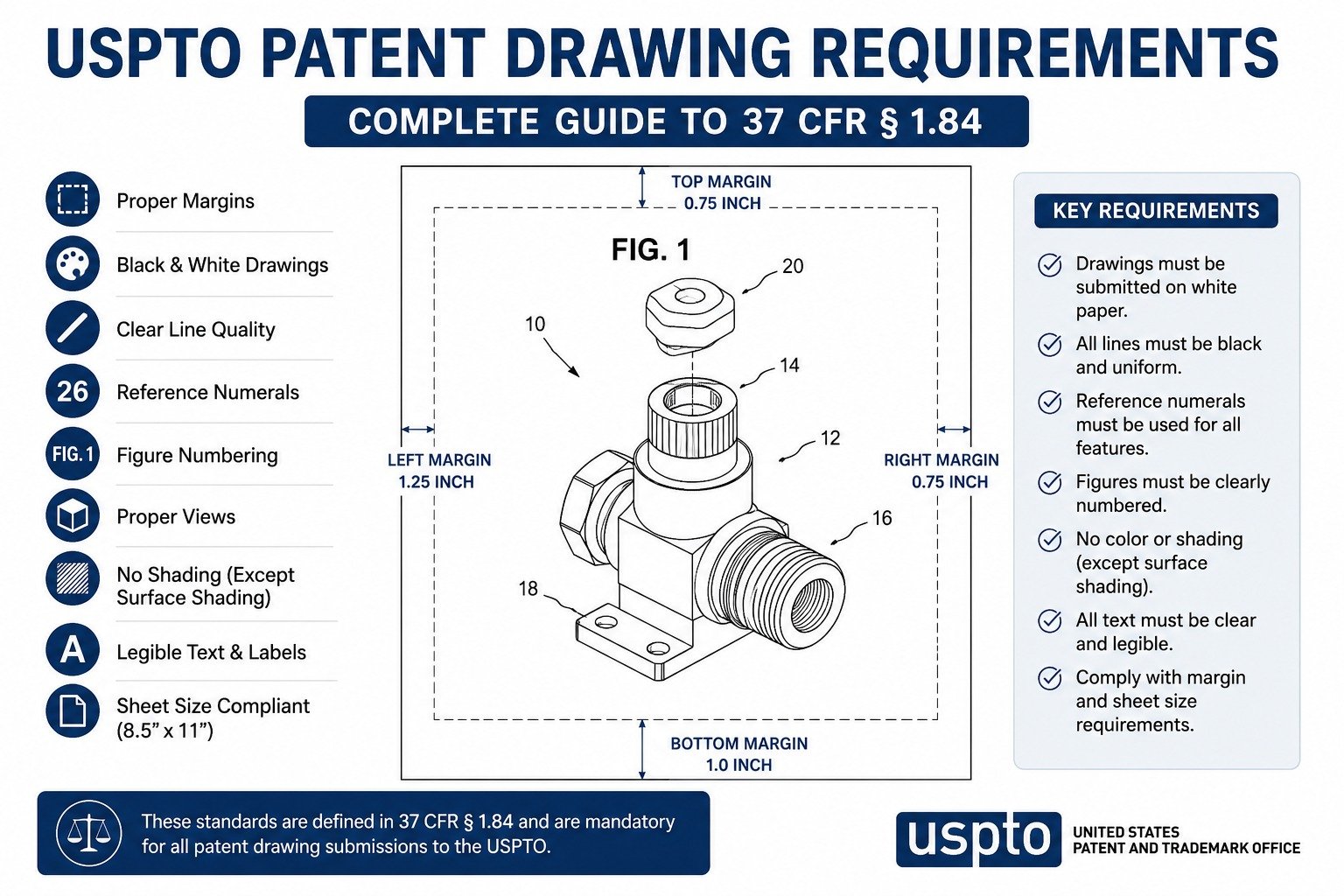
37 CFR § 1.84 is the USPTO regulation that sets the formal standards for patent drawings. It doesn't cover the content of the invention itself, but it governs how every sheet must be prepared. Key requirements include:
- Paper size: either US Letter (21.6 × 27.9 cm / 8.5 × 11 in) or A4 (21.0 × 29.7 cm), with every sheet in an application matching the same size
- Margins: minimum margins on each sheet, kept free of figures, reference characters, and page numbers
- Line quality: durable, black, sufficiently dense lines of uniform thickness, without color or grayscale unless a petition has been granted
- Reference characters: plain, legible numerals and letters, sized to remain readable after standard reduction, positioned outside the drawing figures
- View numbering: figures labeled consecutively as “FIG. 1,” “FIG. 2,” and so on, with sheets also numbered consecutively
- Shading: permitted, and often expected in design applications, using evenly spaced lines rather than solid black fills
- Color and photographs: not normally accepted for utility or design drawings unless the applicant files and is granted a petition explaining why they're necessary
- Identification: the title of the invention, inventor's name, and application or docket number may appear within the top margin, and replacement sheets must be labeled accordingly
These are the formal requirements most often at issue when a patent drawing mistake leads to an objection, so it's worth checking every sheet against this list before filing.
What Happens If Patent Drawings Have Errors?
If patent drawings don't meet USPTO formatting requirements, the examiner will typically issue a drawing objection, often as part of an Office Action, identifying the specific defect. This is separate from the substantive examination of whether the invention itself is patentable.
Once an objection is issued, the applicant is given a set period to respond with corrected or replacement drawings addressing the exact defect noted. This process can add several weeks or months to prosecution, and may involve additional illustrator or attorney fees to prepare and file the corrected sheets. If a response deadline is missed, the application can ultimately be abandoned.
It's worth noting that resolving a drawing objection only clears a formatting hurdle. It doesn't affect, and doesn't guarantee, the outcome of the separate substantive examination that determines whether an invention meets the requirements for patentability.
How to Avoid Patent Drawing Mistakes
A practical, step-by-step process can catch most patent drawing mistakes before they ever reach an examiner:
- Start drawings early. Begin the drawing process alongside the specification, not as an afterthought once the application is otherwise complete.
- Confirm the patent type first. Utility and design applications call for different drawing approaches, so confirm which applies before drafting begins.
- Provide clear source material. Give your illustrator clean sketches, CAD files, or photographs, along with any patent office feedback if drawings are being corrected.
- Follow 37 CFR § 1.84 from the first draft. Build margins, sheet size, and reference numeral conventions into the drawing template from the start.
- Cross-check against the claims and specification. Confirm every claimed feature appears in the drawings, and that reference numerals match throughout.
- Get an independent review. Have someone who wasn't involved in creating the drawings check them against the checklist below before filing.
- Keep editable source files. Save and back up original drawing files in case corrections or replacement sheets are needed later.
Patent Drawing Checklist Before Filing
A quick pre-filing checklist to catch common patent drawing mistakes:
- Correct sheet size used consistently throughout (Letter or A4)
- Margins meet the required minimums on all four sides
- All lines are solid black and consistently weighted
- Reference numerals are consistent across drawings and the specification
- Figures are numbered consecutively and match every “FIG.” reference in the text
- All claimed features and components are shown
- Appropriate views are included for the invention type
- Shading, if used, is evenly spaced rather than solid or gradient
- No stray marks, watermarks, or non-standard symbols appear in the drawing area
- Drawings have been reviewed against the claims and specification
- Files have been checked at reduced size for legibility
- Editable source files are saved and backed up
Can a Professional Patent Illustrator Help Avoid These Mistakes?
Yes. A professional patent illustrator who regularly prepares drawings under 37 CFR § 1.84 is generally better positioned to avoid the formatting mistakes covered in this guide, mainly because these are recurring, well-documented pitfalls rather than unpredictable errors.
An experienced illustrator brings a repeatable process for margins, reference numerals, view selection, and shading, along with the technical skill to turn a rough sketch, CAD file, or product photo into an examiner-ready figure. That said, an illustrator's role is generally focused on drawing compliance and technical accuracy — it's still worth having your patent attorney or agent review the drawings against your claims and overall filing strategy.
Why Choose The Patent Experts?
The Patent Experts prepares USPTO-focused patent drawings for utility, design, mechanical, and 3D-modeled inventions, along with replacement drawings for applications that have already received a drawing objection. A few things worth knowing about how the team works:
- Drawings are prepared with USPTO formatting requirements in mind, from margins and reference numerals through to view selection and shading
- The team includes experienced patent illustrators who work across utility, design, mechanical, and 3D modeling projects
- An NDA can be signed before a project begins, for inventors and attorneys who want confidentiality in place upfront
- Revisions are available so drawings can be refined before they're finalized for filing
- The team works with individual inventors, startups, businesses, and patent attorneys across the United States
[Internal link opportunity: Utility Patent Drawings]
[Internal link opportunity: Design Patent Drawings]
[Internal link opportunity: 3D Modeling]
If you already have drawings that were objected to, or you're starting a new utility or design application, The Patent Experts can help prepare or correct drawings aimed at USPTO compliance from the start.
[Internal link opportunity: Replacement | Objected Drawings]
FAQs About Patent Drawing Mistakes
What are the most common patent drawing mistakes?
The most common patent drawing mistakes include incorrect margins, low-resolution or blurred images, inconsistent reference numerals, missing views, improper shading, and drawings that don't match the written description. Most of these issues trigger a formal objection rather than an outright rejection of the invention itself.
Can patent drawing mistakes cause a rejection?
Drawing mistakes typically result in an objection rather than a rejection of the claims. The examiner issues a notice requiring corrected or replacement drawings. Unresolved drawing issues can still contribute to delays, or abandonment, if correction deadlines aren't met.
What is 37 CFR § 1.84?
37 CFR § 1.84 is the USPTO regulation setting technical standards for patent drawings, covering paper size, margins, line quality, reference characters, view numbering, shading, and when color or photographs are permitted. Utility and design drawings must generally meet these standards.
Do design patent drawings have different requirements than utility drawings?
Yes. Design patent drawings must show the full ornamental appearance of the invention from multiple views, since the drawings define the claim. Utility patent drawings focus on illustrating structure and function, generally with more flexibility in which views are included.
What happens after a patent drawing objection?
After an objection, the applicant typically receives a set period to respond with corrected or replacement drawings addressing the specific defect noted. Responding within the deadline keeps the application moving; missing it can put the application at risk of abandonment.
Can I fix patent drawings after filing?
Yes, drawings can generally be corrected after filing by submitting replacement sheets, often in response to an examiner's objection. Corrections must follow USPTO formatting rules and cannot introduce new matter beyond what was originally disclosed.
Are color patent drawings allowed?
Color drawings and photographs are generally not accepted for utility or design applications unless the applicant files an approved petition explaining why they're necessary. Black-and-white line drawings with line shading are the default expectation for most applications.
How many views are required for a design patent?
Design patents generally require enough views — front, back, top, bottom, sides, and perspective, as applicable — to fully disclose the invention's ornamental appearance. The exact number depends on the design's shape and which surfaces are visible or significant.
Do patent drawings need to be to scale?
Patent drawings don't need a stated scale, but elements within a drawing should be shown in accurate proportion to one another. If a detail is too small to show clearly, an enlarged “Detail” view with a lead line back to the original figure is typically used.
How long does it take to fix rejected patent drawings?
Turnaround depends on the number of sheets and the complexity of the correction, but replacement drawings can often be revised faster than the original set since the underlying figures already exist. Any response still needs to fit within the USPTO's stated deadline.
Should an inventor hire a professional for patent drawings?
Many inventors work with a professional patent illustrator because they're already familiar with 37 CFR § 1.84 and the formatting details examiners check most often. This doesn't guarantee approval of the application, but it does reduce the chance of common, avoidable drawing objections.
Can patent drawing mistakes delay the entire application?
Yes. A drawing objection pauses substantive progress on the application until corrected drawings are filed and accepted, adding time to the overall examination timeline. Addressing formatting issues before filing is the most reliable way to avoid this kind of delay.
Conclusion
Most patent drawing mistakes come down to formatting details rather than the underlying invention itself — margins, reference numerals, missing views, or drawings that drift from the written description. On their own, none of these are complicated to fix. Left unchecked, though, they're one of the more common reasons a straightforward application ends up with an avoidable objection and a longer path through examination.
Working through the checklist above before filing, or having an experienced patent illustrator prepare your drawings from the start, is generally the more efficient route to a USPTO-compliant drawing set. If you're preparing a new application or responding to a drawing objection, The Patent Experts can help with utility, design, mechanical, 3D, and replacement patent drawings prepared with USPTO formatting requirements in mind.
[Internal link opportunity: Contact The Patent Experts]
SEO & Publishing Details
1. SEO Title: 15 Patent Drawing Mistakes That Delay Applications
2. Meta Description: Avoid the 15 most common patent drawing mistakes that trigger USPTO objections and delays. Learn 37 CFR § 1.84 requirements and how to file compliant drawings.
3. SEO Slug: /patent-drawing-mistakes-that-delay-your-application/
4. Blog Card Description: From wrong margins to missing views, these 15 patent drawing mistakes are among the top reasons the USPTO objects to drawings. See what to check before you file.
5. Suggested Internal-Link Anchor Texts:
- Utility Patent Drawings
- Design Patent Drawings
- Replacement | Objected Drawings
- 3D Modeling Services
- Trademark Drawings
- Patentability Search
- About The Patent Experts
- Get a Quote / Contact Us