Software & AI Patent Drawings: Flowcharts & Examples
Software inventions and inventions involving artificial intelligence are the most difficult to draw as well as the most often rejected due to the lack of adequate drawings by patent examiners. The fact is that a software-based invention cannot be illustrated as a physical object that can be depicted in the drawing. In other words, you should make your drawings do something that photography simply can’t.
Below you will find information on what should be included in the drawings of software and artificial intelligence inventions, what kinds of drawings can be used to satisfy USPTO and international requirements, and how to avoid objections to your application.
The illustration for a utility patent application for a mechanical invention normally depicts the structure of the invention. Because there is no physical structure to software or AI inventions, an illustration of these inventions should illustrate:
It is for this exact reason that flowcharts, block diagrams, and architectural diagrams make up the foundation of software and AI patent filings, as opposed to the isometric drawings and exploded views you would find in a mechanical patent.
Patent examiners will need to see every step and every component that is claimed in a drawing. Failure to have a step in a function represented in the drawings is a fairly frequent reason for receiving a rejection or a request for corrected drawings.
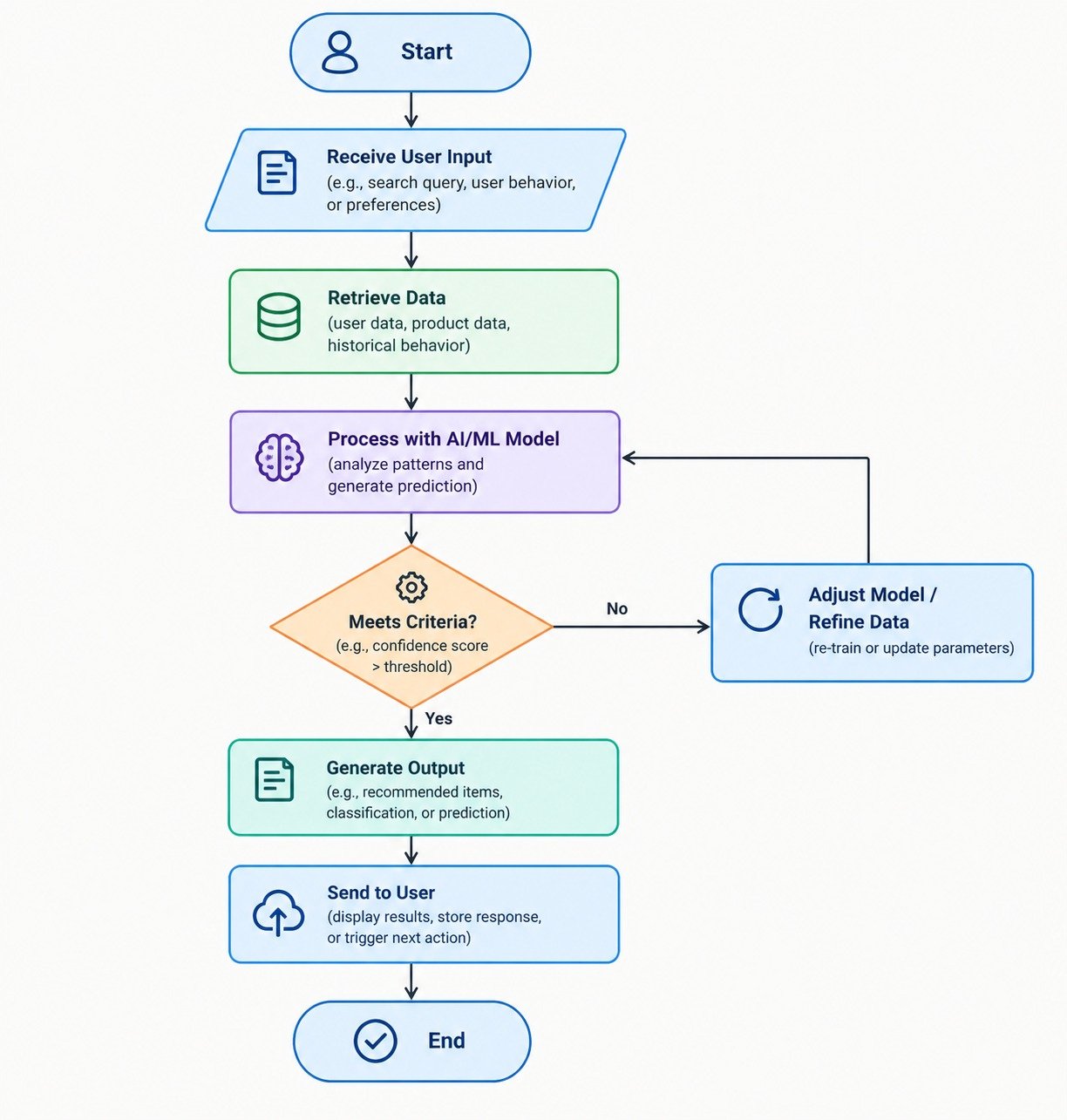
Flowcharts are used exclusively in patent applications as software drawings. They are used to illustrate an algorithm or a process step by step, with each step represented by standard symbols (an oval represents start/stop, rectangle represents process, diamond represents decision).
For AI inventions specifically, flowcharts are used to show things like:
Any properly created flow diagram should mirror the claimed steps of the method in the specification — all the claimed steps should have a corresponding numbered box in the flow chart that is cited by a reference numeral.
A block diagram represents the organization of software/AI systems and not the process flow. Block diagrams are important for system/apparatus claims to show the relationship between different elements:
However, block diagrams become particularly crucial for patent applications related to AI because the examiners require that the model or the algorithm be depicted as an individual functional block.
Data Flow Diagrams represent the process of flow of data from start to finish. This comprises the following for AI inventions:
Such diagrams are helpful in situations where the novelty of a claim resides in the manner in which the data is manipulated or moved about.
In case where a software invention includes a number of entities/systems that interact with each other in time, e.g. a user device, a server, and an API from a third party, then a sequence diagram can show the sequence of interaction among them.
In case some aspect of your innovation involves a new GUI, interface design or screen display, then UI drawings might be required and these have their own format requirements, especially when you plan to obtain a design patent on your interface.
Inventions specific to AI will require drawings depicting the architecture of the model that includes layers, nodes, connections, and information flow in a neural network, decision tree, or an ensemble model. The drawings should be simple enough to conform to patent office drawing guidelines but still depict the architecture accurately.
Whether a drawing is schematic or technical, any patent drawing filed with the USPTO (and other patent offices like the EPO or JPO) should adhere to the following guidelines:
Flow charts for software programs and block diagrams are just as open to these format guidelines as mechanical diagrams — a flow chart drawn by hand in a meeting with engineers will often require redrawing before it is filed.
The main reasons for which software and AI patent drawings get rejected are:
This can be done prior to filing and not when one receives an office action, thus saving a lot of time and money. This is the reason why a lot of patent lawyers and agents utilize the services of a good patent illustration service.
Transforming a raw process description, whiteboard drawing, or engineer’s architectural notes into patent drawings ready for the examiner entails both patent drafting skills and technical drawing accuracy. A good patent drawing company usually:
This is where a service like The Patent Experts fits in – helping out patent lawyers, patent agents and IP departments of companies with utilities, designs, trademarks and replacement drawings, along with flowcharts, block diagrams and architectural diagrams which form the basis of software and AI applications. With quick turnaround times, unlimited amending capabilities and complete compliance with USPTO and other patent office standards, the objective is to ensure that drawing quality does not become an obstacle for your patent application process.
Think about an example of an AI-related invention - a system for sorting customer support tickets into appropriate departments via a machine learning algorithm. Inventor’s first description could simply consist of a list of actions. Preparing the drawings for such an invention would usually include the following steps:
The result is a drawing set that examiners can follow claim-by-claim, which reduces the likelihood of drawing-related office actions.
Do software patents require drawings?
For the majority of times, yes. Though software patents don't have to satisfy the requirement for structural elements, it is common practice within patent offices that any drawing required for an adequate understanding of the invention must be provided, especially in case of method and system patents.
Can AI algorithms be shown in a patent drawing?
Yes, the algorithms used in AI are generally described using flow diagrams for the steps of processing, block diagrams for various blocks like training block and inference engine, and some neural network model architectures too, but not the code.
What's the difference between a flowchart and a block diagram in a patent application?
Flowcharts illustrate the steps involved in the process, with decisions and results included in the chart. Block diagrams illustrate the structural elements that make up the system and their interactions with one another.
How many drawings does a software patent application need?
This is dependent on the complexity of the invention. A simple invention may only need one or two flow charts, whereas an intricate AI system could call for several drawings, which include a system architecture drawing, process flow charts, data flow diagrams, and user interface drawings if necessary.
Do software and AI patent drawings need to be in color?
No. Drawings for standard utility patents, which include software and artificial intelligence drawings such as flowcharts, are required to be in black and white format unless a petition for color drawings is filed and approved.
Can I submit hand-drawn sketches or whiteboard photos as my patent drawings?
The sketches, drawings by hand and pictures are all helpful as references, but these usually have to be converted to official line drawings in order to be filed. This is where an online patent drawing service can come in handy.
What file formats are needed to start creating patent drawings?
Most companies providing patent drawings will be able to create the required drawings based on rough sketches or drawings in JPG or PNG format or even PDF files.
How long does it take to get software patent drawings prepared?
This is dependent upon the complexity of the invention; however, many patent illustration services provide quick turnaround time for their services, with 24-hour turnaround being common, while more complex drawings take longer.
What happens if my patent drawings are objected to by the examiner?
Where a patent office raises objections to the drawings on account of any problem with missing numbers in the drawings, rough lines, or problems in correspondence between claims and drawings, then usually the applicant will have to provide new drawings.
Are patent drawing requirements the same across all countries?
Wrong. Although there is great deal of similarity, each office like the USPTO, EPO, JPO, etc., has its own particular standards with respect to margin, numbering, and style of drawings. Therefore, drawings need to be prepared separately for each office.
In regard to software and AI patents, however, patent drawings are not only important for legal formalities but also can be the best way to show what is new in your process or system invention. Flowcharts will allow you to describe logic of the process, diagrams – its architecture while diagrams of models will enable you to explain how your artificial intelligence invention differs from others. It is therefore essential to get your patent drawings done properly from the very start.
If you're preparing a software or AI patent application and need flowcharts, block diagrams, or architecture drawings that meet USPTO and international patent office standards, The Patent Experts can turn your rough sketches, notes, or diagrams into filing-ready drawings — with fast turnaround and no charge for amendments.

At “The Patent Experts” our team specialises in turning complex concept and ideas into exact complaint patent drawings that meet the stringent guidelines of USPTO, EPO, WIPO among other major patent offices around the globe. With over 5+ years of experience, our team of skilled illustrators are efficient in producing high quality utility designs and trademark patent drawings. By combining cutting-edge technology with a deep understanding of global patent regulations, we ensure every drawing we create is ready for seamless submission and approval.
Quicks Links
Get in touch
Our phone number
Our email address
© 2026 The Patent Expert's All Rights Reserve
Made with ♥ by Website99